

This article was written at the end of 2024. We have since then migrated our infrastructure to Kubernetes
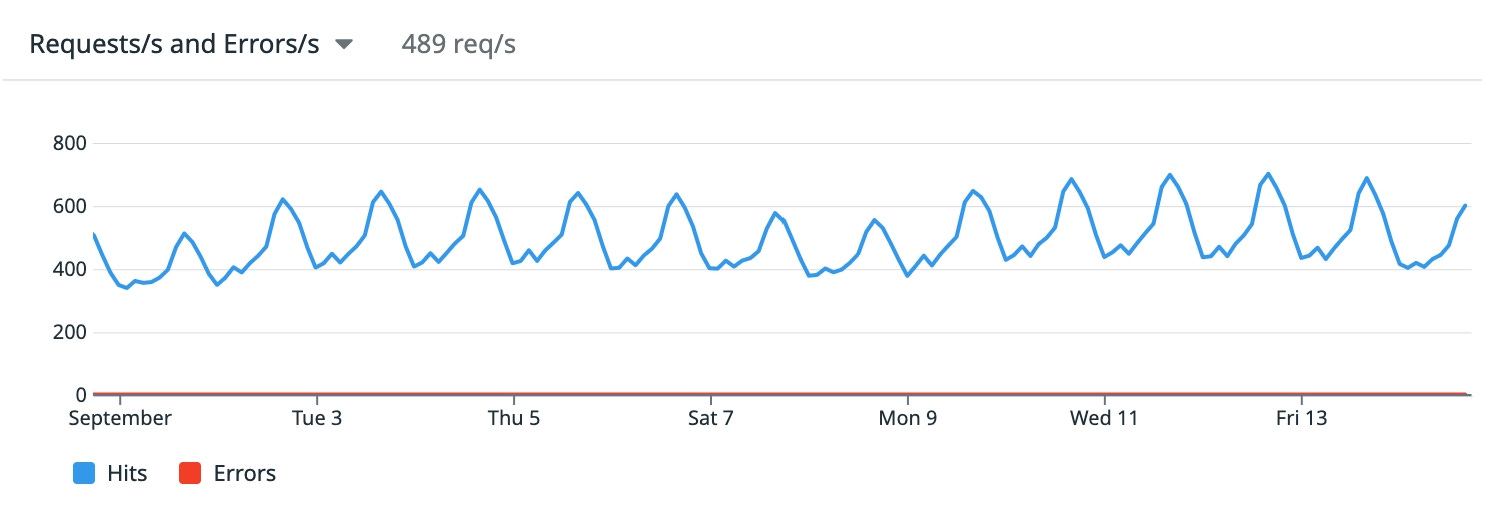
We’ve been using Django Rest Framework (DRF) for 5 years now at Photoroom. We leverage it to sync users’ projects across clients (iOS, Android, Web), allow team members to collaborate (comments, reactions) and manage billing.
For the first few years, we scaled this backend on a single VM using a few simple tricks. In this article, we’ll share our learnings scaling it to 10+ million monthly active users and ~500 queries per second.
General architecture
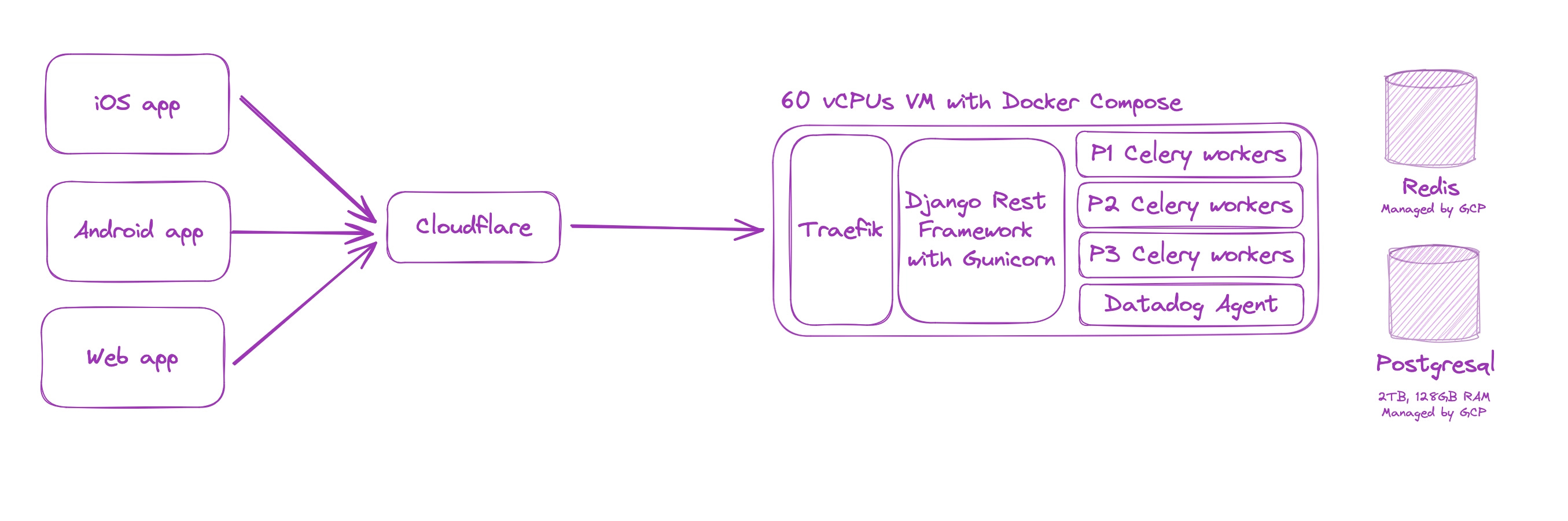
As shown in the image above, the setup is dead-simple and quite standard: a reverse proxy (Traefik) in front of DRF. Like all of our servers, the VM is behind Cloudflare’s network to protect it against DDOS and monitor against attacks (more on that later).
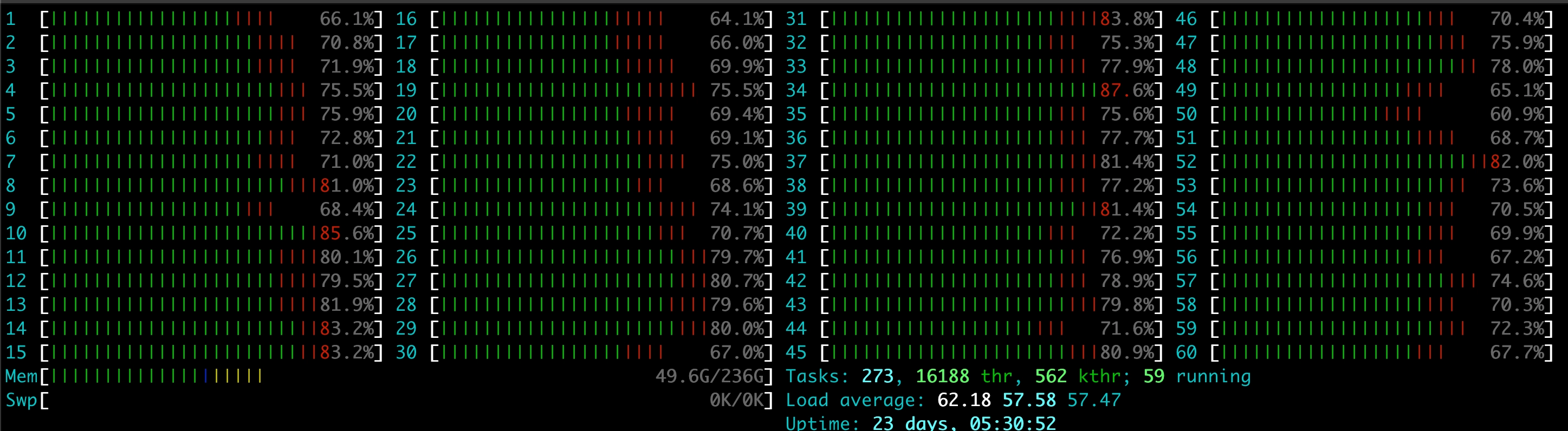
The VM boasts a whopping 60 cores, and it started to be quite busy as you can see:
For background tasks, we leverage Celery. We have 3 levels of priorities for our workers:
Blocking (P1): for tasks that require an response before the request completes, with a latency target of ~100ms. Example: uploading a few assets in parallel before responding
High priority: for tasks that need to complete in a timely manner but can run late from time to time. Examples: sending notifications after an action is completed or sending events for analytics
Background: for long running background tasks, some of which can run for a long time (up to a few minutes). For example: sending aggregated analytics, periodic cleanups.
Performance & monitoring
If you’ve played with Django, you probably already know to leverage select_related() / prefetch_related() and carefully add indexes before deploying. But all the carefulness in the world won’t protect you against unexpectedly slow queries. Responses might be fast when the first requests start hitting a route, then get much slower as the table grows.
To prevent those issues, we always carefully monitor for any slowness using an APM (Application Performance Monitoring, for instance Datadog or Dynatrace). Each request is traced and we can analyze the slow paths. Slowness stems from too many many factors: from slow database queries, unoptimized libraries, external services that misbehave.
We have alerts on latency, error rate and throughput. The first 2 are thresholds while the latter leverages anomaly detection. We also have a strict no-error-policy on the Stripe webhooks and get alerted if there’s a single error, regardless of the reason.
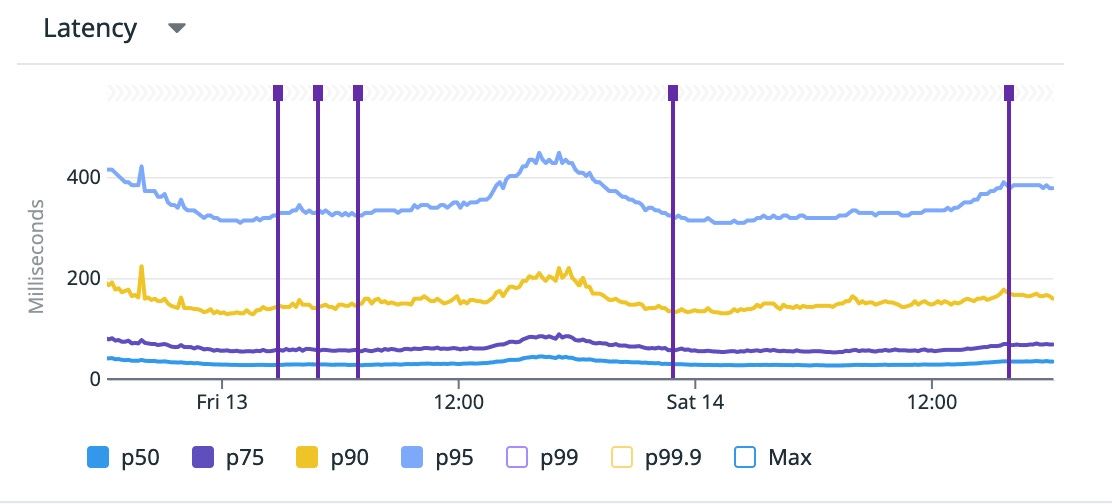
The practice of always analyzing and monitoring results in a rather decent performance, with a large majority of the requests below 100ms:
Authentication
In the early days, we picked Firebase for authentication. It saved us countless hours of implementation and maintenance for login mechanism on our 3 platforms (iOS, Android, web). And most likely avoided a few security vulnerabilities. But we ran into a limitation.
As we reached the 100M downloads mark, we ran into a surprise: you can’t have more than 100M anonymous users in Firebase. We leverage anonymous auth to allow our users to explore the app without logging-in, while maintaining a stable user identifier across all of our services. At some point we also made the mistake of adding Firebase auth on our website, adding a few millions visitors to the tally.
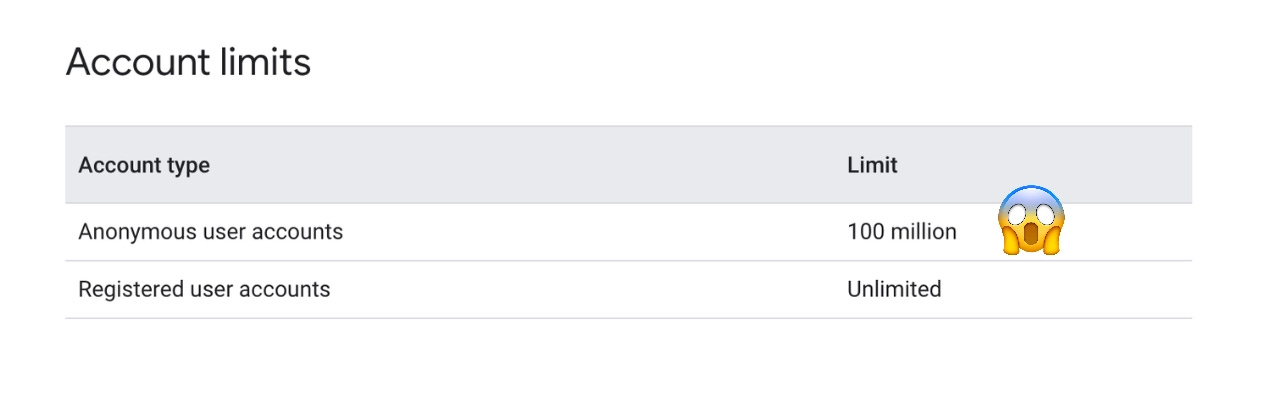
We now have alerts and deletion scripts to remove anonymous users who haven’t been active for the past 3 months. Knowing who has been active required a few changes: we didn’t have any reason to store data from non-registered users in our backend. We now have a custom routes that monitors active users.
As it’s relying on Google’s services, our app is also mostly unusable in mainland China. I’m also a bit worried about adding OIDC and SAML: they are part of “Identify Platform”, which would cost us as hefty $70k / month (list price)
Despite those limitations, we don’t regret picking Firebase as it has proven reliable and a huge time-saver.
Leveraging Cloudflare’s cache
We serve around 600TB of data per month, mostly images. This backend proxies them, but we’re in the process of splitting this use case into an independent FastAPI service to ease up on the load. Most of the image requests don’t reach Django, as they are cached by Cloudflare. If we were to use Vercel for the same volume, it would cost us $150k/month just for the traffic [1].
We also cache the content of the homepage of the app, so it is close to the user and the first load is quicker. This sometimes had unexpected consequences: someone updates the homepage from our backoffice, accidentally adds botched content/json, goes back home. A few hours later the cache refreshes and users all around the world start reporting crashes on startup 😢.
An astute reader might raise that an app should never crash decoding JSON. I would oppose that we also use that JSON for rendering images and fonts dynamically, which tends to be more error-prone. Regardless, we’ve since taken actions to much strongly validate the content. We also ensure that Photoroom employees get served un-cached content to be able to spot any issue faster. We also have a Slack command to bust the Cloudflare cache in case it got poisoned with bad content.
Scaling Postgresql
Most people on Hacker News will tell you that Postgres is the only database you’ll need. It’s been true for us. Scaling has mostly been a breeze and it has been mostly forgiving. We still had implement a few tricks.
Trick 1: this one is obvious, but we use a managed DB. Duplicating the DB for test is a breeze. Figma did this, scaling to the maximum of RDS until they were large enough to hire DB experts[3]. Life is too short to manage your database
Trick 2: We disabled long running queries. There is generally no reason for a mobile app to make the user wait more than 15 seconds (user would most likely be gone by then). If not monitored, long running queries can block migrations and other queries. Therefore we prevent queries with the flag POSTGRESQL_STATEMENT_TIMEOUT. Don’t forget to disable the flag for migrations however.
Trick 3: We disabled counts on pagination. Indeed, running a count in Postgres, especially on fast-changing data, can be quite costly. Most very large apps do so, for instance Gmail. We simply query pageSize + 1 items to let the client know if there’s a next page [2]

Trick 4: We acknowledge that we can’t hire people who are both backend experts and database tuners, so we work with an agency with experts on the topic. They tend to be expensive and the level of competency of the person assigned to you varies, but it’s overall useful
Trick 5: Periodic backups with point in time recovery. In case someone messes up badly, we can revert to a few minutes before the incident. Knowing this makes me sleep better at night.
Our dream setup would be to be able to replicate the database with anonymized data + replicate a realistic load pattern, but we have yet to find a simple way to do this
Collaborating with developers on 3 platforms
Photoroom is available on iOS, Android and the web. While we’re working hard on moving most of the REST communication in our Rust multi-platform engine, for a little while each platform still has to write code to communicate with the Django backend.
In the early day, we simply put specs on Notion. Unsurprisingly, this didn’t work very well. We now expose OpenAPI specs, documenting the routes, parameters and responses. We leverage drf-spectacular for this. We also stick to the REST patterns as much as possible, which makes the inner workings of the API more predictable.
We can also monitor the traffic the apps send through custom request headers. For complex serialized json, we also add the name of the platform who serialized it in case some botched JSON goes through the schema validation (botched can also mean non-existing assets, wrong ordering, inconsistent positioning, things that are harder to validate)
Headers to know the platform and who serialized a project. pr-app-version and pr-platform

pr-platform header. pg represents our Rust cross-platform engineMistakes we made
One day we DDOSed ourselves when a developer misconfigured a deployment and it kept calling a route every 10ms
We periodically run cleanups for inactive free users’ data. The homepage content of the app is owned by user 0 in the DB. The first time we ran the cleanup, we accidentally deleted the official content since user 0 hadn’t been “active” for a while.
On another Django project, we accidentally deployed it in another region than the database it was talking to. If you’re looking for ways to make all your REST requests 200ms slower, I recommend this technique
Good decisions we took
Adding an APM from the very first day, allowing us to debug and investigate slow queries. Today, we couldn’t leave without it
Adding a linter to prevent non-concurrent indexes adding. Adding index without the
CONCURRENTLYkeyword locks the table, leading to unnecessary downtime.Dedicating time to continuously cleaning and improving the codebase + writing a post mortem on every downtime
Conclusion and what’s next
Overall, Django Rest Framework has been reliable and very forgiving. As Photoroom is crossing the 200 million mobile downloads mark, most our challenges are ahead. Among others, we’ll need to:
Update the deployment procedure, using a single VM won’t scale much more
Partition or rework the way we store projects, with the largest Postgresql table being close to 1.5TB
Update our architecture to support real-time collaboration on top of Django
If this challenge is of interest to you, we’re looking for a Django backend engineer (remote in Europe). Your scope will include this backend as well as the backends that power GenAI features in Photoroom. Email eliot@photoroom.com with your resume, along with a Django trick you learned over the year. You must have extensive Django experience to apply.
[1] Vercel charges us an hefty $250 / TB for our traffic country mix. 250 * 600TB = $150k. Those are list prices, you might be able to get discounts.
[2] You can view more tricks like this one in Squeezing Django performance for 14.9 million users on WhatsApp by Rudi Giesler
[3] https://www.figma.com/blog/how-figmas-databases-team-lived-to-tell-the-scale/